Fortunica Casino App: Download and Play on Mobile

The Fortunica app brings the full casino experience to your phone - slots, live tables, sports betting and payments in one place. Available as an APK for Android and through the App Store for iOS. No feature cuts, no exclusive locks - everything from the desktop version works on mobile.

Casino + sportsbook welcome bundle
Registerwith bonus

Why Play on the Fortunica App

The main reason to use the Fortunica app instead of a browser is consistency. The app loads faster on a mobile connection, keeps your session active without browser tab interruptions, and renders live casino streams more stably on slower 4G connections.

The interface adapts to any screen size automatically. Bottom navigation gives quick access to your profile, game search, providers list, favourites and the cashier - all without scrolling to the top.

The app is not a stripped-down version. You get the same 2,000+ games, full sportsbook with live betting, all promotions including the weekly reload offers, and the same deposit and withdrawal methods available on desktop. There are no app-exclusive bonuses, but every active promotion from the main site is accessible inside the app.

For players who use crypto, the app is especially convenient - Bitcoin, Ethereum, USDT TRC20 and other supported coins can be deposited and withdrawn directly from the mobile cashier.
Visit Fortunica Casino

How to Download the App

Visit the official Fortunica Casino website from your mobile browser. The download links for both Android and iOS are available on the site - look for the app section or a banner near the footer or main menu.

  • Android: download the APK file directly from the site (not Google Play).
  • iOS: install through the App Store using the link on the site.

The Android APK file is 5.57 MB, which is compact and will not take noticeable space on your device. Download takes seconds on any stable connection.

QR code access may also be offered on the desktop version of the site - scan it with your phone camera to open the correct download page directly.

No third-party sources are needed. Using unofficial APK mirrors is a security risk - always download from fortunica.casino.

Installing on Android

After downloading the APK, you need to allow installation from unknown sources in your Android settings. The path is usually:

  1. Open Settings on your Android device.
  2. Go to Security or Privacy (varies by Android version).
  3. Enable 'Install unknown apps' or 'Allow from this source' for your browser or file manager.
  4. Open the downloaded APK file and tap Install.
  5. Once installed, open Fortunica from your home screen.

Common issue: if the install is blocked, check that you granted permission to the correct app (the browser you used to download, or the Files app). Some Android versions ask for this permission per-app.

The app requires no special permissions beyond standard storage and network access. After install, the permission to install unknown apps can be turned off again for security.

The Fortunica APK is 5.57 MB. Installation takes under a minute on any Android device running Android 6.0 or newer.

Installing on iOS

iOS players can install Fortunica through the App Store via the link provided on the casino website. Unlike Android, no manual permission changes are needed - the App Store handles verification automatically.

After installation, you may need to trust the app profile on some older iOS versions: go to Settings - General - VPN and Device Management and confirm the developer trust.

Push notifications can be enabled during first launch or later in iOS settings. This is useful for receiving alerts about new promotions, tournament starts and reload bonus windows (Tuesday and Saturday).

If the App Store version is not available in your region, the mobile browser version of Fortunica works as a progressive web app (PWA) on Safari - add it to your home screen for a near-native experience.

Try Fortunica on Mobile

System Requirements

The Fortunica app does not demand high-end hardware. Below are the minimum requirements for smooth operation:

Platform Minimum Requirement
Android OS Android 6.0 or higher
iOS iOS 12.0 or higher
RAM 1 GB minimum, 2 GB recommended
Storage 10 MB free space
Internet Stable 3G connection minimum
Browser (PWA) Chrome 80+, Safari 14+

Live casino games and HD streams perform best on a 4G or Wi-Fi connection. Slots and RNG table games work acceptably on 3G.

Registration Inside the App

New players can register directly from the app without visiting the desktop site. The process mirrors the web version exactly:

  1. Tap 'Register' in the top right corner of the app.
  2. Enter your email address and create a password.
  3. Select your preferred currency (EUR, USD or GBP).
  4. Confirm you are 18 years of age or older.
  5. Accept the terms and conditions.
  6. If you have a promo code, enter it in the welcome bonus field at this stage.

Registration takes around 20 seconds. After completing it, you can deposit and start playing immediately. Full KYC verification must be completed within 72 hours of your first withdrawal request - not before you play.

Key Features of the Fortunica App

The mobile app is built on HTML5, which means every game, table and live stream runs natively inside the app without plugins or additional downloads.

Interface highlights:

  • Bottom navigation bar: profile, menu, providers, favourites, search
  • Real-time balance and bonus progress display
  • Game search by title or provider name
  • Favourite games list saved across sessions
  • Last played games remembered automatically

Security features active in the app:

  • 128-bit SSL encryption on all connections
  • PCI-DSS compliant payment processing
  • Certified RNG for all slot and RNG table games
  • AML-compliant transaction monitoring

The app also gives access to 24/7 live chat support and the full help centre with answers to common questions.

Play at Fortunica Casino

Sports Betting in the App

The sportsbook is fully integrated into the app under a dedicated Sports tab. You can switch between pre-match and live betting without leaving the app or logging in again.

Available sports include football, basketball, tennis, handball, boxing, cricket, MMA and table tennis. eSports markets are also covered. The bet builder tool lets you combine multiple selections from a single match into one custom bet.

Live betting shows real-time odds updates. The bet slip opens on the right side of the screen - on mobile it slides up from the bottom as a panel.

Explore the full Fortunica betting section for sport-specific promotions and odds details.

Bonuses Available in the App

All promotions from the main Fortunica Casino site are active in the app. There are no mobile-exclusive offers, but you do not miss out on anything by playing on mobile.

Key bonuses accessible from the app:

Bonus Details
Welcome Package 290% up to 3,000 GBP plus 200 free spins across 3 deposits
Weekday Reload Tuesday only - up to 100% bonus plus 50 FS on step 5
Weekend Reload Saturday - bonus equal to average of 3 deposits, max 500 EUR
Weekly Bonus 50% to 200% depending on VIP level, max 1,000 GBP
Cashback 2% to 10% weekly on losses, paid in real money, no wagering
Wheel of Fortune 1 spin per 1 GBP wagered, prizes include free spins and cash

The welcome bonus requires a minimum deposit of 10 GBP for the first step. Wagering is 40x on the bonus amount for casino offers. Full details are in the Fortunica bonuses page.

Live casino games do not count toward bonus wagering at Fortunica. Complete your wagering requirement on slots before switching to live tables.

Login and Account Management

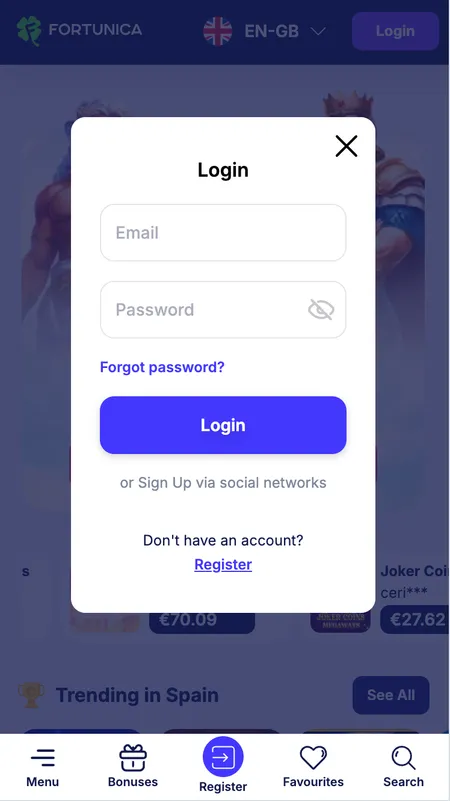
Logging in on the app works the same as the web version. Tap 'Login' in the top right, enter your email and password. The app can remember your credentials for faster future access.

Your account dashboard shows:

  • Current balance (real and bonus separately)
  • Active bonus progress in percentage and cash equivalent
  • Recent transactions
  • KYC verification status
  • Responsible gambling tools (deposit limits, session limits, self-exclusion)

If you forget your password, the reset process is handled by email. The screen for password reset is accessible directly from the login screen.

For account security, ensure your email is verified and review active sessions if you notice unexpected activity. Two-factor authentication availability - check current app settings, as this feature may be active depending on the app version.

Fortunica casino login screen on mobile

The login screen in the Fortunica app - enter email and password to access your account.

Casino Games in the App

The full library of 2,000+ games is available on mobile. Slots load in the same browser engine used on desktop, so mechanics like Megaways, Hold and Win, and Bonus Buy all function identically.

Live casino streams from Vivo Gaming, HO Gaming and Iconic 21 are optimised for mobile viewports. Bet limits at live tables run from 1 GBP to 5,000 GBP. Game shows are included in the live section.

Slots can be played in demo mode on mobile without registering - useful for testing a game before depositing. Live casino requires a real-money account and active balance.

Gates of Olympus Billion slot
Olympus Billion
Play
3 Clover Pots Extra slot by Booongo
3 Clover Pots Extra
Play
Penguin King slot game
Penguin King
Play
Ultimate Golden Dragon Inferno slot
Golden Dragon Inferno
Play
Ultra Hot Sevens slot game
Ultra Hot Sevens
Play
3 Super Hot Chillies slot
3 Super Hot Chillies
Play

Browse All Games

Payments on Mobile

The mobile cashier supports every payment method available on desktop. Deposits are processed instantly. Withdrawals follow the same timelines as the web version.

Method Min Deposit Withdrawal Speed
Visa / Mastercard 10 GBP 1 to 3 business days
Faster Payments Not available Same day
Bitcoin 10 GBP Minutes to a few hours
USDT TRC20 10 GBP Minutes to a few hours
Ethereum 10 GBP Under 24 hours
Bank Transfer 10 GBP 1 to 3 business days

There are no transaction fees. The cashier natively supports GBP, EUR and USD - British players with GBP debit cards avoid conversion costs. Crypto withdrawals are consistently the fastest option.

Full limits and processing rules are covered on the Fortunica withdrawal page.

App Updates and Reinstallation

The iOS version updates through the App Store automatically if auto-updates are enabled. For Android, periodic new APK versions are published on the Fortunica website - you install them the same way as the original APK.

If the app stops working after a device OS update, download the latest APK from the official site. Reinstallation does not affect your account - your balance, bonus progress and game history are stored server-side.

Before reinstalling: note your login email address. Password recovery is available by email if needed.

App Security

The Fortunica app uses 128-bit SSL encryption for all data transmitted between your device and the server. This includes login credentials, payment details and personal data entered during KYC.

Payments are processed according to PCI-DSS standards, which govern how card and financial data is handled by global payment networks. All transactions are monitored under the platform's AML policy.

The automated bet monitoring system flags unusual activity within minutes - this protects your account from unauthorised use. All RNG games are regularly audited by independent labs to confirm fair outcomes.

FAQ: Fortunica App

Is the Fortunica app free to download?

Yes. The app is free to download on both Android and iOS. Standard data charges from your mobile provider may apply during download.

Why is the Fortunica app not on Google Play?

Android apps for online casinos are typically not listed on Google Play due to store policies. Fortunica distributes its Android app as an APK file directly from the official website fortunica.casino.

Can I use the same account on mobile and desktop?

Yes. Your Fortunica account works across all platforms - mobile app, mobile browser and desktop. Balance, bonuses and history are synchronised in real time.

What should I do if the APK will not install?

Go to Android Settings, find Security or Privacy, and enable installation from unknown sources for your browser or file manager. Then try installing the APK again.

Does the mobile app support crypto deposits?

Yes. Bitcoin, Ethereum, Litecoin, USDT TRC20, USDT ERC20, USDC, DOGE, Tron, TON, BNB and Binance Pay are all available in the mobile cashier.

Are all bonuses available in the app?

All active promotions from the main site are accessible in the app. This includes the welcome package, weekly reload offers, cashback and the Wheel of Fortune. There are no app-only bonuses.

How do I reset my password in the app?

On the login screen, tap 'Forgot password'. Enter your registered email address and follow the reset link sent to your inbox.

Does the app support live casino games?

Yes. Live dealer games from Vivo Gaming, HO Gaming and Iconic 21 are streamed in HD directly in the app. Bet limits range from 1 GBP to 5,000 GBP at live tables.

What are the minimum iOS and Android versions required?

Android 6.0 or higher and iOS 12.0 or higher are required for the Fortunica app to run correctly.

Is there a dedicated support channel in the app?

Yes. The app includes a live chat that connects you with support in under 2 minutes on average. The full help centre is also accessible from within the app.

Fortunica Casino is ready on your phone - same games, same bonuses, same speed. Open your account or log in now.